Wifi
Ethernet Cable Cost Estimator
Estimate Ethernet cable, connector, and wall plate costs fast for home or office network installs, with region-based pricing and waste buffer.
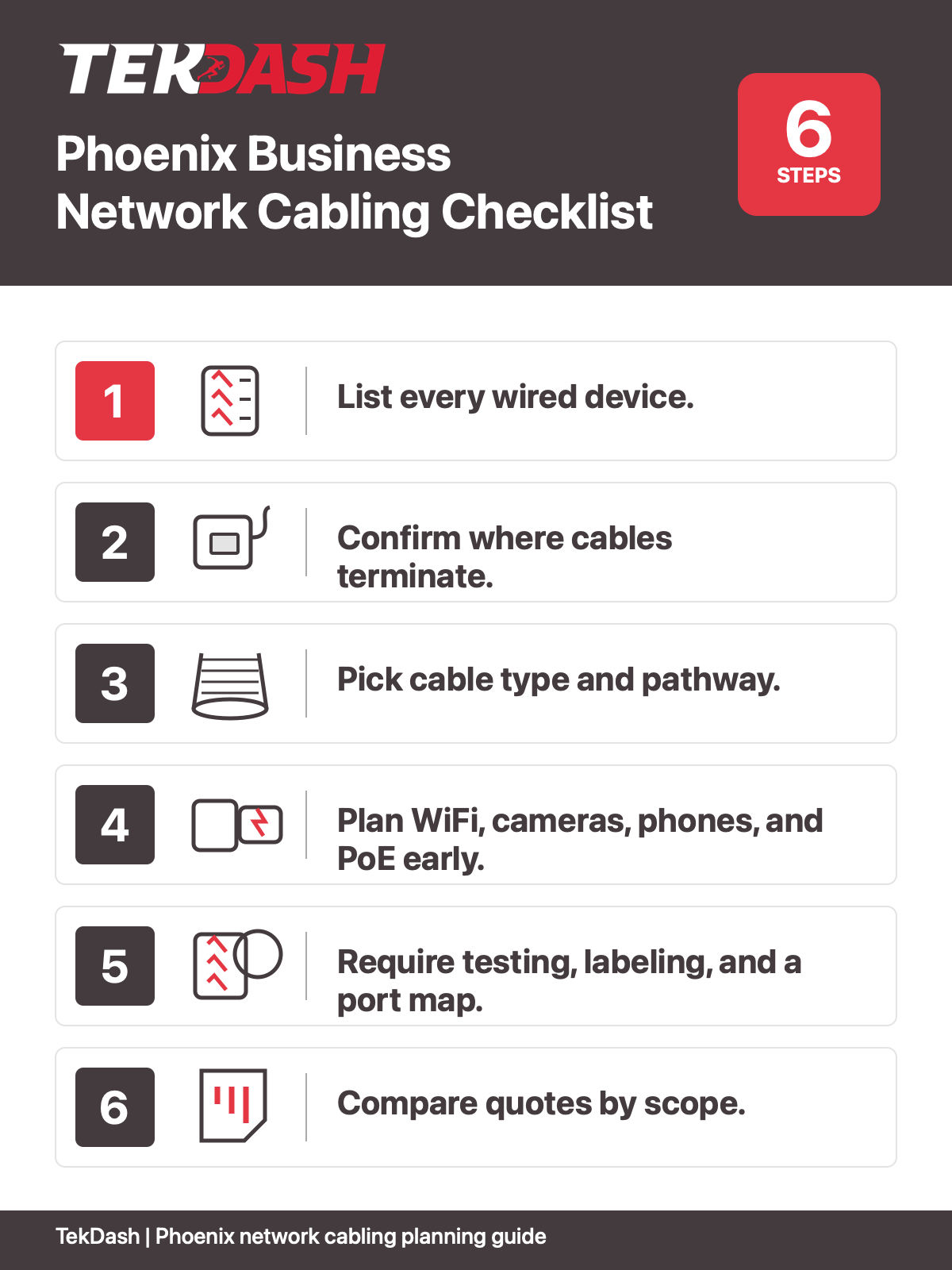
Network cabling installation in Phoenix starts with clear scope, labels, testing, and handoff. Use this checklist before hiring an installer.
Planning Ethernet drops, WiFi access points, cameras, phones, or low-voltage wiring for a Phoenix business? Use this guide before you ask for a quote.
Network cabling is easy to overlook because it hides in walls, ceilings, racks, and patch panels. But when it is planned poorly, everything that depends on it feels the pain: slow WiFi, dead data ports, camera issues, phone problems, messy troubleshooting, and expensive rework.
This guide is for Phoenix business owners, office managers, IT teams, and general contractors who need a practical way to scope a cabling job. If you are ready to talk with a local team, TekDash's network cabling installation in Phoenix is the right place to start.
Before you compare bids, make sure each contractor is pricing the same job. A clean scope should answer these questions:
If a quote skips these basics, it may look cheaper at first but cost more later.
A scope planner helps you walk the space before the installer arrives. Use it to mark rooms, devices, port counts, and notes. It also helps your IT provider and contractor talk about the same layout.
Phoenix network cabling planning tool
Use this worksheet during your walkthrough. Add up the items below, then ask the installer how they will test, label, and document each cable run.
| Item to count | Your count | Notes |
|---|---|---|
| Desks or workstations | _____ | Plan one or more data drops per desk. |
| Printers, copiers, or shared devices | _____ | Mark where each device will live. |
| WiFi access points | _____ | Most business APs should have wired backhaul. |
| Security cameras | _____ | Confirm PoE, mounting height, and cable path. |
| VoIP phones, POS, kiosks, or counters | _____ | Count powered devices separately. |
| Future spare capacity | + 20-25% | Leave room for moves, adds, and changes. |
Do not start by asking, "How many cables do I need?" Start by listing what needs a connection.
Once you know the devices, you can plan drops, cable paths, rack space, and switch ports.
Many offices already have old cables above the ceiling or inside walls. Some are usable. Some are not. Before adding new cable, ask the installer to inspect what exists.
A good installer should not blindly add cable without checking whether the current system can support the new work.
Every cable needs a clear start and end point. Most business cabling runs from a wall jack, ceiling device, or equipment location back to a network closet, rack, or wall cabinet.
Ask how the installer will handle:
Clean termination makes future troubleshooting much easier. Messy termination turns every small change into a guessing game.
A business cabling job should include more than pulling cable from one point to another. At minimum, your scope should cover planning, cable routing, termination, labeling, and testing.
Standards matter here. The ANSI/TIA-568.1-E commercial building telecommunications cabling standard and ICT cabling standards are useful references when you want cabling work to be structured and supportable.
For Phoenix buildings, it is also smart to plan around heat, ceiling access, tenant improvement schedules, and coordination with other trades.
WiFi problems are often cabling problems in disguise. If access points are placed in weak locations or connected to poor cable runs, the wireless network will struggle.
Plan WiFi access point locations before the cable pull. Think about coverage, ceiling height, walls, user density, and where power-over-Ethernet switches will sit. For dedicated wireless buildouts, see TekDash's WiFi access point installation in Phoenix page.
Network cabling often overlaps with low-voltage systems. Cameras, door controllers, VoIP phones, and access points may all depend on clean data cabling and PoE switches.
If your project includes multiple systems, make sure the cabling scope includes all of them. TekDash also supports low-voltage wiring scopes in Phoenix when network, security, and communications wiring need to be coordinated.
This is one of the easiest ways to separate a serious cabling quote from a weak one.
Ask for:
These items save time when someone needs to move a desk, troubleshoot a port, add a switch, or find a failed cable later.
Two cabling quotes can look similar and still include very different work. One may include patch panels, labels, testing, and cleanup. Another may only include pulling cable and installing jacks.
The cheapest quote is not always the lowest-cost choice if it creates rework.
Most office drops use copper Ethernet cable, but fiber may make sense for longer runs, backbone links, building-to-building connections, MDF-to-IDF links, or high-bandwidth uplinks.
If your project includes long-distance links or multiple network closets, ask whether fiber optic cabling should be part of the plan.
Use these questions during your walkthrough or estimate call:
If the project supports business-critical systems, also review basic security planning. CISA's small business cybersecurity resource hub is a helpful starting point for thinking about the broader network environment.
Good cabling is quiet. It does its job every day without getting attention. Bad cabling gets noticed fast.
If you are planning an office move, tenant improvement, network refresh, camera project, or WiFi upgrade, build the cabling scope before the work starts. For local commercial projects, TekDash's structured cabling services in Phoenix page can help you choose the right next step.
Network cabling installation is the planning, pulling, terminating, labeling, and testing of cables that connect business devices to a network. It can include office data drops, WiFi access point cabling, camera cabling, phone cabling, and rack or patch panel work.
Most business projects use Cat6 or Cat6A copper cable for Ethernet connections. Fiber optic cable may be used for longer runs, building links, backbone connections, or higher bandwidth needs.
They are closely related. Network cabling usually refers to the physical cables that connect network devices. Structured cabling is the organized system of cables, racks, patch panels, labels, and pathways that makes the network easier to manage.
Know how many devices need wired connections, where the network closet or rack will go, whether you need WiFi access point or camera cabling, and whether the installer will include testing, labels, and a port map.
Yes. TekDash supports Phoenix-area businesses with network cabling, structured cabling, data cabling, WiFi access point cabling, fiber optic cabling, and low-voltage wiring. The best starting point is the local Phoenix service page linked earlier in this guide.
Yes. TekDash can coordinate with internal IT teams, managed IT providers, general contractors, and other trades so the cabling scope lines up with the larger project.
Estimate Ethernet cable, connector, and wall plate costs fast for home or office network installs, with region-based pricing and waste buffer.
Discover the ultimate guide to Ethernet installation for homes and businesses. Learn expert tips for planning, setup, and boosting network...
Discover the benefits of network cable installation for homes & offices. Enjoy faster internet speeds, reliable connectivity, and future-proof your...