Wifi
Ethernet Cable Length Calculator
Find the maximum Ethernet cable length for Cat5, Cat5e, Cat6, or Cat6a based on your speed, with clear guidance on unsupported setups.
Plan ahead and use business-grade hardware, Cat6a cabling, VLANs, and cloud-managed tools to build a scalable network affordably.
Designing a network that grows with your business doesn’t have to cost a fortune. Here's the key takeaway: plan ahead, invest in the right hardware, and use cost-effective tools to keep expenses low.
With careful planning, you can build a network that supports growth without breaking the bank.
Before diving into hardware purchases, it’s essential to define your network’s specific needs. Start by creating a complete device inventory. Count every device connected to your network - computers, printers, smartphones, tablets, VoIP phones, and IoT devices. Don’t forget to include guest devices as well.
Next, think ahead and plan for the next two years. If your team is likely to grow, your network should be ready to handle the expansion without requiring a complete overhaul. For example, if you currently have six devices, consider a switch with 12–16 ports instead of an 8-port one to leave room for growth.
Bandwidth-intensive applications also play a big role in determining your network needs. Tools like video conferencing, cloud storage, and large file transfers demand consistent upload speeds and minimal latency. A general office user typically needs around 25 Mbps, but heavy users, such as graphic designers or video editors, may require 100+ Mbps. For a team of 10, aim for at least 250 Mbps, but 500 Mbps provides a better buffer for busy periods.
Take the time to evaluate your workspace. Look for signal weak spots, dead zones, and potential interference, and ensure that ethernet and power outlets are accessible. Map out your current network setup and monitor bandwidth usage to identify peak times and bottlenecks.
If your team includes remote or hybrid workers, your network needs to support secure VPN connections and remote access. Also, pinpoint any single points of failure in your current setup that could disrupt operations.
Once you’ve outlined your technical requirements, it’s time to figure out how much you’re willing to spend.
For most small businesses, building a scalable network can typically be done for under $5,000. A good rule of thumb is to budget around $100–$300 per user for basic network equipment. For a small office with 5–10 employees, expect to spend between $4,500 and $7,500, which includes hardware, installation, and security configuration.
Here’s a rough breakdown of costs:
Invest in business-grade equipment rather than consumer models. While a consumer router may cost $50–$150, a business router priced between $500 and $2,000 is designed for 24/7 operation and often has a lifespan of around five years.
To save money, see if you can reuse existing equipment. Does your current cabling support higher speeds? Are your switches or access points still under warranty? However, avoid cutting corners on critical components like your router or firewall, as these are crucial for maintaining network security and performance.
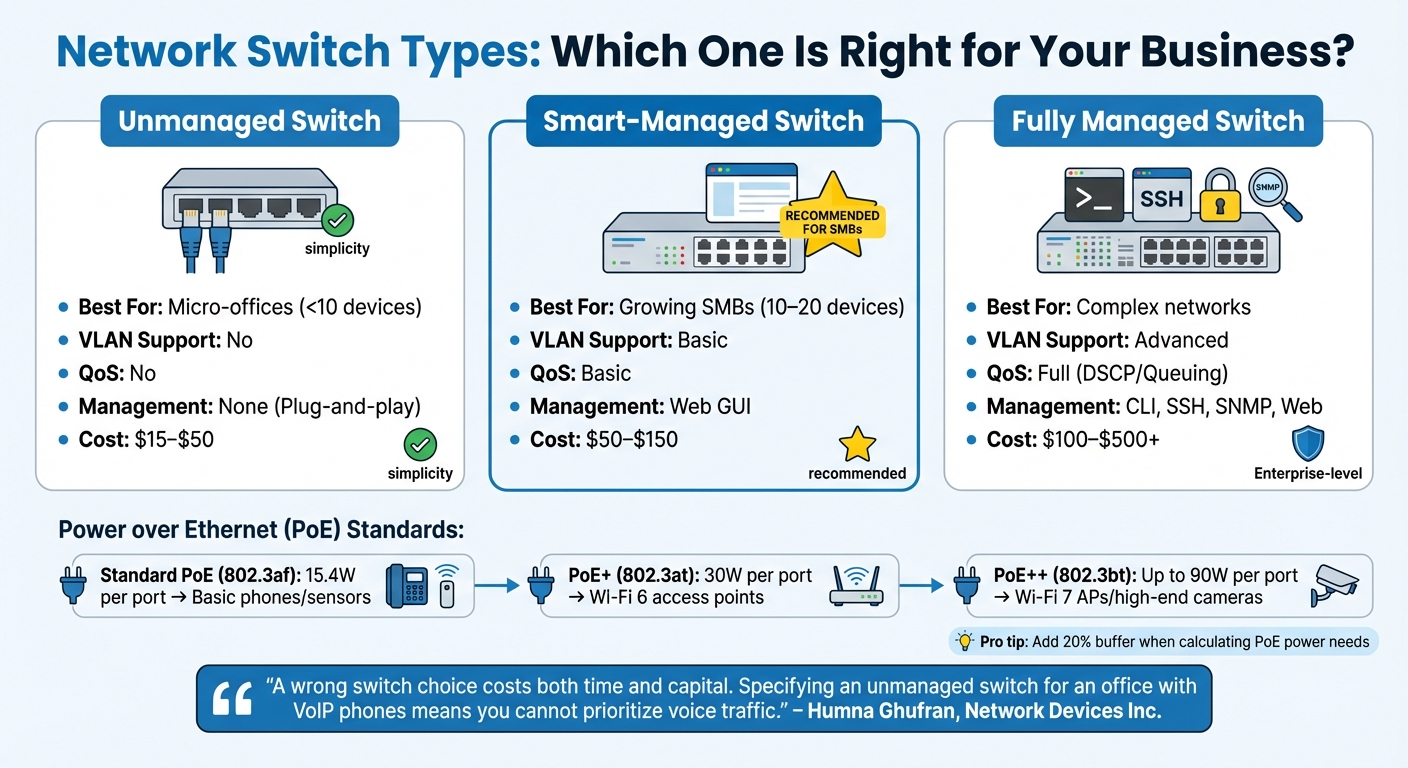
Network Switch Types Comparison: Features, Costs, and Best Use Cases
Once you've nailed down your requirements and budget, the next step is to pick hardware that supports growth without breaking the bank. The goal is to find equipment that balances modular expansion and intelligent management features - without the hefty price tag of top-tier enterprise gear.
Choosing the right switches and routers is crucial for keeping your network scalable and efficient. For example, switches with modular SFP/SFP+ uplinks allow you to upgrade to high-speed fiber connections (1 Gbps or 10 Gbps) without replacing the entire unit. Switch stacking can also simplify network expansion by enabling multiple switches to operate under a single IP address.
For smaller offices, smart-managed switches are often the sweet spot. They offer essential functions like VLANs and Quality of Service (QoS) through user-friendly web interfaces, with prices ranging from $50 to $150 for an 8-port Gigabit model.
If your setup includes VoIP phones or modern Wi-Fi access points, Power over Ethernet (PoE) standards become important. Here's a quick breakdown:
When calculating your PoE power needs, always add a 20% buffer to account for boot-up power spikes.
"A wrong switch choice costs both time and capital. Specifying an unmanaged switch for an office with VoIP phones means you cannot prioritize voice traffic." - Humna Ghufran, Network Devices Inc
If you're looking to save, refurbished switches can cut costs by 50%–70% while delivering comparable performance. For instance, MikroTik's CRS305 offers four 10GbE SFP+ ports for just $130–$160, making it a cost-effective option for 10GbE networking. Additionally, Direct Attach Copper (DAC) cables are a budget-friendly choice for short-range connections (under 16 feet), offering 10 Gbps speeds for just $10–$20.
| Feature | Unmanaged Switch | Smart-Managed Switch | Fully Managed Switch |
|---|---|---|---|
| Best For | Micro-offices (<10 devices) | Growing SMBs (10–20 devices) | Complex networks |
| VLAN Support | No | Basic | Advanced |
| QoS | No | Basic | Full (DSCP/Queuing) |
| Management | None (Plug-and-play) | Web GUI | CLI, SSH, SNMP, Web |
| Cost | $15–$50 | $50–$150 | $100–$500+ |
With switches and routers sorted, it's time to focus on cabling solutions to ensure your network is ready for the future.
The right cabling can make or break your network's ability to handle future upgrades. While Cat5e cables can manage Gigabit Ethernet up to 328 feet, Cat6a is a smarter choice if you're planning for 10GbE speeds or deploying Wi-Fi 6E/7 access points. Cat6a supports 10 Gbps over the full 328-foot distance, whereas Cat6 is limited to around 180 feet at those speeds.
The cost difference is minimal - just a few extra cents per foot - but opting for Cat6a now can save you from costly upgrades later.
For connecting multiple floors or buildings, fiber-optic SFP or SFP+ uplinks are the way to go. They prevent bottlenecks between access switches and your core infrastructure. And if you're working with PoE, stick to Cat5e or better to minimize power loss due to cable resistance.
| Cable Type | Max Speed | Max Distance | Best Use Case |
|---|---|---|---|
| Cat5e | 1 Gbps | 328 ft | Standard office workstations |
| Cat6 | 1 Gbps (10G up to 180 ft) | 328 ft | General future-proofing |
| Cat6a | 10 Gbps | 328 ft | 10GbE uplinks and Wi-Fi 6/7 APs |
| DAC (SFP+) | 10 Gbps | 16–23 ft | In-rack switch-to-server links |
| Fiber (MMF) | 10–100 Gbps | 984 ft+ | Inter-floor or inter-building links |
Once you've chosen your hardware, the next step is to structure your network so it can grow without adding unnecessary complexity or cost. A solid network design allows you to expand - whether it's adding users, devices, or even new locations - without needing to rebuild everything from scratch.
The 3-tier architecture - comprising the Access, Distribution, and Core layers - is widely regarded as the go-to model for scalable networks. The beauty of this setup lies in its modularity: each layer can grow independently. Here's how it works:
"This modular design allows each layer to scale independently as the network expands, while redundancy ensures high availability." - Sheldon, FS.com
One of the most cost-effective tools in this design is VLANs (Virtual Local Area Networks). VLANs let you create separate logical networks on a single physical switch. For instance, instead of buying separate hardware for each department, you can segment them - like Reception, HR, IT, and Finance - into different VLANs using one managed switch.
Here’s an example: In December 2025, network engineer iYÁOmarv_ set up a branch office for an oil company with just one router and one switch. By using VLANs (e.g., VLAN 10 for Reception, 20 for HR, 30 for IT) and a /26 subnetting strategy, they later added a Finance/Sales department (VLAN 40) using a reserved subnet block - no additional hardware was needed.
For smaller setups, a "Router-on-a-Stick" configuration can handle multiple VLANs using sub-interfaces on a single router. Alternatively, Layer 3 switches with Switch Virtual Interfaces (SVIs) offer faster internal routing without relying on an external router. Even entry-level managed switches, like the TP-Link TL-SG108E (starting at $30), make VLAN segmentation affordable.
| Layer | Primary Role | Recommended Hardware Type |
|---|---|---|
| Access | Connects end-user devices (workstations, cameras, APs) | Unmanaged PoE or Smart-Managed Switches |
| Distribution | Aggregates traffic, enforces security, inter-VLAN routing | L2+ or L3 Managed Switches |
| Core | Provides high-speed backbone for the network | High-throughput Managed Switches with 10G+ uplinks |
This modular design sets a strong foundation for future scalability.
A scalable architecture is only part of the equation - you also need to plan ahead to meet future demands. For example, by 2026, a typical small business might manage anywhere from 30 to 80 devices, including IoT gadgets, mobile phones, and work equipment. If you're currently supporting 40 devices, it’s smart to plan for at least 60–80 to avoid reconfiguring your network when you grow.
Use non-default RFC1918 addresses (e.g., 10.10.x.x) and reserve extra subnets for future departments. A /26 subnet provides 62 usable host addresses, but poor planning can lead to disruptions. For example, when iYÁOmarv_'s client added a fifth department (Administration), their initial /26 scheme ran out of IP addresses, forcing them to acquire a new block (192.168.2.0/26) - a headache that could have been avoided with better foresight.
Additionally, invest in high-quality cabling (like Cat6a) and spare conduits during your initial setup. Upgrading physical cabling later is disruptive and expensive. Also, make sure to accurately calculate PoE (Power over Ethernet) requirements upfront, as underestimating can lead to costly switch replacements down the line.
Once you’ve set up a scalable network structure, the next step is making sure it’s managed effectively. Luckily, modern network management tools make this possible without requiring an expensive IT team or high-priced enterprise software.
Software-Defined Networking (SDN) and cloud-managed platforms offer centralized control of your entire network through a single dashboard. Instead of logging into each device individually, you can easily push updates, enforce security policies, and monitor performance across all devices simultaneously. This saves a significant amount of time and reduces the risk of configuration errors - an issue responsible for 80% of network attacks in small businesses.
Another time-saver is Zero-Touch Provisioning (ZTP). With ZTP-compatible devices, new equipment automatically downloads its configuration from the cloud as soon as it connects to the internet. This means you can deploy devices at remote locations without needing to send a technician, cutting both travel costs and labor hours. For example, TP-Link’s Omada Software Controller is free to download and can handle up to 10,000 devices, depending on your server hardware. Their cloud-based Omada Central Essentials also offers features like automated firmware updates, remote PoE port management, and AI-driven Wi-Fi optimization - all without additional costs.
Here’s a quick comparison of SDN versus traditional network setups:
| Feature | SDN (Software-Defined Networking) | Conventional Setup |
|---|---|---|
| Configuration | Centralized via one interface | Manual per device |
| Deployment | Remote with Zero-Touch Provisioning | On-site manual setup |
| Scalability | Add devices with a click | Limited; manual integration needed |
| Maintenance | Automated performance optimization | Reactive troubleshooting |
| Visibility | Real-time traffic and topology charts | Limited to individual logs |
The financial benefits are hard to ignore. Centralized platforms can cut on-site service visits by about 60% and reduce IT support expenses by 40% to 60%. Additionally, many platforms, such as Ubiquiti’s UniFi, TP-Link Omada, and Aruba Instant On, don’t charge recurring licensing fees. Compare this to enterprise options like Cisco Meraki, which can cost around $1,200 annually for a 20-person office.
SDN doesn’t just simplify management - it automates it. Tasks like load balancing, enforcing security policies, and troubleshooting can be handled automatically. AI-powered tools can detect faults around the clock, suggest optimizations, and even adjust Wi-Fi channels in real time to minimize interference. This means better performance, less downtime, and fewer manual interventions.
IPv6 is another upgrade worth considering. With IPv4 addresses running out, IPv6 offers an almost unlimited pool of addresses, making it easier to scale your network as you add more devices, especially IoT gadgets, which are becoming common in modern offices. Most modern routers and switches already support IPv6, so enabling it now ensures your network stays future-proof without needing major reconfigurations later.
"If you build it right the first time, it will last 5–7 years with minimal headaches, predictable maintenance costs, and strong protection against modern threats." - Kevin Willette, CEO, Verus Corp
Professional support can be a game-changer when it comes to setting up a scalable network for your growing business. Without an in-house IT team, the process might feel daunting, but TekDash offers an affordable solution to make it seamless.
TekDash specializes in both on-site and remote tech support, helping businesses create networks that can grow alongside them. Their certified technicians handle everything - from Ethernet cable installation to extending WiFi coverage - ensuring that your network is set up correctly right from the start.
The process begins with a custom assessment, which can be done virtually or in person. During this step, technicians evaluate your specific needs and provide a transparent quote. For example, professional Ethernet installation typically costs between $1,200 and $2,000 for four cable drops, with a $100 walkthrough deposit that’s applied to your final bill.
Customers appreciate the problem-solving expertise of TekDash. Larry P. from Philadelphia shared:
"TekDash was the only company with a vision to see past the generic connecting of wires and came up with an innovative solution for the installation of my home ethernet".
TekDash doesn’t just stop at installation - they offer flexible, long-term support so your network can continue to meet your needs as it evolves.
TekDash's pricing model is designed for flexibility, eliminating the need for expensive annual contracts. Remote support starts at $60 for the first 90 minutes (with $40 per additional hour), while on-site support begins at $145 for the first 90 minutes (then $75 per hour). A 15% quality assurance fee ensures certified professional standards are consistently maintained.
For software troubleshooting or configuration adjustments, remote support can save you up to 60% compared to on-site visits. TekDash also provides ongoing network services, such as Ethernet line speed certification. This service helps verify that your network infrastructure is performing optimally and identifies potential cable issues before they cause problems.
With a 4.9/5-star rating from 28 reviews for Ethernet installation, TekDash has earned a reputation for reliability. Monica R. from Austin, TX praised their service:
"Fast response, courteous technician, and the problem was fixed right the first time - for a very reasonable price!".
TekDash’s efficient approach helps reduce downtime and keeps your network running smoothly as your business scales.
Building a network that can grow with your business while staying within budget takes careful planning. Start by evaluating your current requirements, selecting hardware that fits your needs, and designing with future expansion in mind. Opting for Cat6 or Cat6A cabling now can save you from expensive rewiring later, and modular switches with SFP+ uplinks allow for growth without overhauling your entire system.
Once the hardware is in place, effective management is key to maintaining performance. VLAN segmentation and using wired connections for stationary devices, such as POS systems and security cameras, help ensure a stable and reliable network.
Affordable management tools, like cloud-based platforms and automation, can cut down on the need for costly in-house IT staff. And if your business lacks technical expertise, professional support can make all the difference. TekDash’s certified technicians handle everything from Ethernet setup to keeping your network running smoothly over time.
To prepare your network for growth, begin by evaluating the current needs of your devices and users. Once you have a clear picture, plan for at least double the capacity over the next two years to accommodate future demands. Opt for switches with expandable ports, invest in Wi-Fi 6 or 6E routers to support faster speeds and higher device density, and select internet plans with additional bandwidth to handle activities like cloud services and video conferencing. Always prioritize hardware that allows for scalability to keep your network flexible and ready for what's next.
VLANs are a smart way to improve security, performance, and organization within a network. By isolating devices or specific user groups, they help limit the spread of breaches, block unauthorized access, and streamline traffic management. This makes them especially useful for keeping business, personal, and IoT devices separate.
While a flat network might be fine for very small setups with minimal risk, it leaves your network more exposed and complicates traffic control as it grows. VLANs, on the other hand, excel when it comes to scaling and segmenting traffic effectively.
For straightforward tasks like setting up Wi-Fi routers, boosting signal range, or connecting a handful of devices, doing it yourself is usually achievable with the help of step-by-step instructions. But when it comes to more advanced setups - like multi-gigabit networks, fiber optic installations, or professional office systems - bringing in an expert can make all the difference. Professionals not only ensure the right hardware and security measures are in place but also help you avoid expensive errors while setting up a system that’s built to last.
Find the maximum Ethernet cable length for Cat5, Cat5e, Cat6, or Cat6a based on your speed, with clear guidance on unsupported setups.
Compare the costs, speeds, and reliability of fiber and cable internet to find the best option for your needs and budget.
Discover the benefits of network cable installation for homes & offices. Enjoy faster internet speeds, reliable connectivity, and future-proof your...